

IP SECURITY INTEGRATOR


Access Control System
Access control is focussed on controlling who has access, e.g. to an office or facility.
This is typically achieved by restricting access by certain types of groups or access levels. With access control visitors, employees, executives, freelancers or employees can easily and securely access.
There are different fields of access control such as network access control, logical access control and physical access control.
Unlike open access, access control provides control and security to address security and convenience to keep your business running securely.
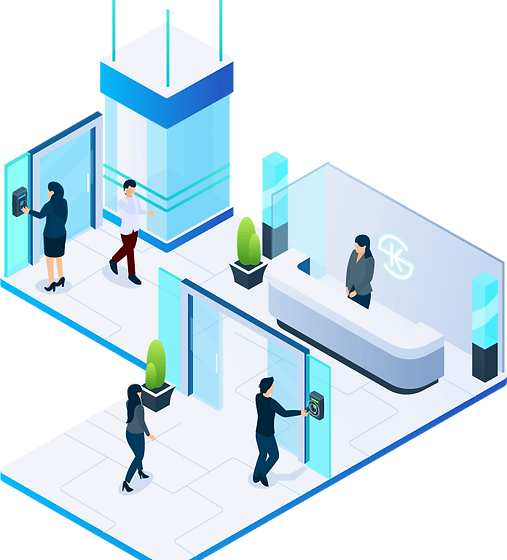
The access control methodology


Along the top are five phases of electronic access control (Authorize, Authenticate, Access, Manage and Audit) that turn in the case of physical access control the many strangers coming and going into authorized users and - eventually into auditable members. The concept becomes even more powerful when paired with digital file or workstation access control.access control methodology
Along the bottom is a full stack of access control hard- and software for managing employees, visitors, executives but also for audit and controlling. Through integrations with a cloud based physical access system at the core they get even better when used together, helping you to grow your security strategy and practice.
The Proven Methodology To Secure Your Growing Business
In the world of on-demand availability, access is extremely important - often assumed. Certainly it's easy to say "I'd like to restrict and control access and that's why I'm looking at access control."
In the end the question is: How should we set up access control to least interfere with user behavior but provide the secure controls our business needs?
With the access control concept and AnalyticsENG's on-demand access, you have an unfair advantage for getting everyone through the door while keeping control and being able to scale a proven model.
- and software for managing employees, visitors, executives but also for audit and controlling. Through integrations with a cloud based physical access system at the core they get even better when used together, helping you to grow your security strategy and practice.

The 5 Phases of Access Control
Authorize

You don't want just anyone coming to your facility. You want people who you know have permission to be here.
How to authorize them efficiently so they can get in while the others stay out?
You share or provision access with them from your system so they are expected and subject to your security rules.
Role based access control (RBAC)
Access Control Policies
Access control list
The door has pre-existing electrified locks or they are installed by certified Analytics Engineering installer.
Your space - your rules.
Policies define what people are allowed to do - and what not.
Which members of your organization can share access with whom?
Which groups have access to which doors? Policies regulate exactly that.
The access control list is in modern
organisations mostly organized as directory -
some sort of list that lists all
authorized users and their access
level.
Authenticate
Once you’ve authorized employees or visitors, the next step for them is to authenticate when they want to access.
To do so they have gotten some sort of credential, or token during the authorization process.
They present this credential to e.g. a door reader that check if it is valid.
Credential / Token
Single Sign On (SSO)
Two-Factor-Authentication (2FA)

The door has pre-existing electrified locks or they are installed by certified Kisi installer
The door has pre-existing electrified locks or they are installed by certified Analytics Engineering installer Sign On (SSO)
The door has pre-existing electrified locks or they are installed by certified AnalyticsENG installer
Access
You’re on the right track.
You’ve authorized the right visitors or employees, they authenticate with their credentials but now you need to get them actual access.
How can you most effectively do this?
The access control tools available at this stage make sure you’re getting everyone in the right door at the right time, faster and easier.
Unlock
Trigger
Track
After the user is correctly authenticated, he actually can unlock whatever he wants to access. This happens by clicking a button, presenting a card, fob or badge which requests access.°
Once the request to access has been received by the access control system, the access is triggered, e.g in form of a door unlock.
If the door unlocks, multiple events are tracked at once: The user triggered an unlock, the user was correctly authenticated, the door opened and the door closed

Manage
Managing an access control system can be quite a challenge -
Adding new access points while on-and offboard users, keeping the system secure and help troubleshoot problems are some of the challenges that require an excellent access control setup.
I15
Scale
Monitor
Troubleshoot
You are opening a new office next month and need to add physical access control quickly. Cloud-based physical access systems can help with flexible and modular extensions of the existing setup
Keeping an eye on all access points and getting alerted when things are going sideways is for many access managers a priority. Online systems allow to get updates in real time, not when users already complain or have trouble.
Should access points or users have issue, modern access control systems are remotely configurable or allow for support from the vendor. Compared to locally hosted systems this is a big advantage.

Audit
Auditing access control can have multiple purposes:
You can audit your system settings and permissions or authorizations.
You can review suspicious or flagged events. Some companies also do audits in terms of access control compliance reportings in regular time-frames.
System Review
Suspicious Events
Compliance Reports
To make sure everything on your access control system is set up properly, companies do regular system reviews or maintenance. Avoid users being in the system that have left the company and review access control policies.
To make everything on your access control system is set up properly, companies do regular system reviews or maintenance. Avoid users being in the system that have left the company and review access control policies.
If your company processes sensitive data like payment or health data you will have to comply with audit requirements in the access control space. Some special certifications like cyber security or ISO certifications also require managed and auditable access control. Reports
FaceDeep 5 IRT
Best In Class of AI Based Smart Face Recognition Terminal with Infrared Thermal Temperature Detection
FaceDeep 5 IRT is a new AI-based face recognition and temperature screening terminal equipped with a dual-core Linux-based CPU and the latest BioNANO ® deep learning algorithm.
Combined by the multispectral imaging technology through an infrared light camera and a visible light camera to ensure live face detection function .


FACEDEEP
Smart Face Recognition and RFID Terminal
BEST IN CLASS OF AI BASED SMART FACE RECOGNITION TERMINAL
FaceDeep 5 is the new AI-based face recognition terminal equipped with a dual-core based Linux based CPU and the latest BioNANO® deep learning algorithm. It supports up to 50,000 dynamic face database and rapidly recognize users within 2M(6.5 ft) in less than 0.3 seconds and customizes alerts and a variety of reporting for no-mask wearing.
M-Bio
Desktop and cloud based wireless fingerprint and RFID time and attendance device
M-bio is a new generation desktop wireless cloud-based fingerprint and RFID time and attendance device. With fast Linux based 1Ghz CPU, and latest BioNANO fingerprint algorithm, M-bio ensures a less than 0.5 second comparison time under 1:3000 status. The Wi-Fi and Bluetooth function realizes the flexible installation and operation. The Web-server function realizes easily self-management of the device. M-bio also supports management on smartphone by Crosschex Mobile App or by web and cloud-based platforms.

FacePass 7 IRT

Touchless for Securer Identification
Avenir Light is a clean and stylish font favored by designers. It's easy on the eyes and a great go to font for titles, paragraphs & more.
Secure Identification in Various Environment and Conditions
With the verification of over one million faces around the world, FacePass 7 IRT has become one of the most accurate face recognition terminals suitable for various environment and conditions.
-
Makeup
-
Hairstyle and Beard
-
Expression Changes
-
Glasses
-
Hat
BEST IN CLASS OF AI BASED SMART FACE RECOGNITION TERMINAL
< 0.5s
Identification time
< 1s
Registration time
BioNANO®
Facial Algorithm
Most Secure-by Infrared Light Imaging Technology
Facepass 7 IRT is equipped with an Infrared live face detection camera and an Infrared thermal temperature detection camera to keep security of your business.
.png)
.png)
Infrared Camera
Black and white image for recognition
Visible Light Camera
Color image for preview
.png)
IR Thermal
Cameras
.png)
Temperature Range
10°C~50°C
Deviation
< ±0.3°C

Ultra Match- S2000
Standalone Iris Recognition System
Fast Identification
Anviz Iris recognition products use binocular recognition technology, which effectively solves the instability and randomness of traditional single-eye Iris recognition. It uses a high-speed interactive platform to achieve rapid recognition of less than 0.5 seconds per person.

Utilizes the most accurate biometric recognition technology

Color LED shows the proper verification distance

Mobile management enabled by wireless connection
UltraMatch series products has a stylish design and reliable performance. Adopting BioNANO algorithm, the system provides the most accurate, stable, and quickest iris recognition while delivering high-level security in biometric enrollment, individual identification, and access control.
Iris recognition system can identify and authenticate users accurately and is not affected by outside environmental conditions.
A web based software and a PC version management software allow clients to manage the system easily. Iris SDK is available to developer and integrator for developing identity management applications or easy integration and expansions to existing security system.
Depending on its high accuracy, the terminal is ideal for high-level security applications, such as Border Protection, Pharmaceutical & Healthcare or Jails.